WiFi-Weather-Station
Daniel Weschke
November 27, 2019
1 Equipment
Raspberry PI
Power supply for the Raspberry PI
SD memory card
Ethernet cable or USB wlan dongle or onboard wlan if available
DHT22 sensor/s and 4.7 kOhm resistors
Cables
Mini breadboard or solder connections
Optional: Internet connection
Temporarily: Keyboard + display
Temporarily: Computer
1.1 DHT22 temperature & humidity sensor
Specifications
Low cost
3 to 5 V power and I/O
2.5 mA max current use during conversion (while requesting data)
Good for 0-100% humidity readings with 2-5% accuracy
Good for -40 to 80°C temperature readings ±0.5°C accuracy
No more than 0.5 Hz sampling rate (once every 2 seconds)
Body size 15.1mm x 25mm x 7.7mm
4 pins with 0.1” spacing
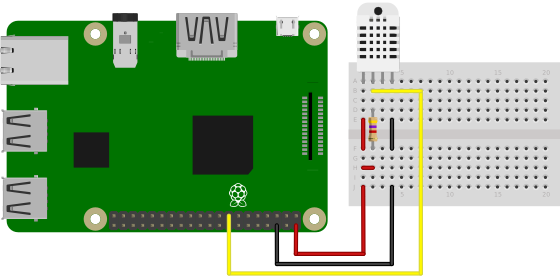
VCC - red wire Connect to 3.3 - 5V power. Sometime 3.3V power isn’t enough in which case try 5V power.
Data out - white or yellow wire
Not connected
Ground - black wire
Weight: 2.4g
Pin 3 is not used. Place a 4.7 kOhm - 10 kOhm resistor between VCC and the data pin, to act as a medium-strength pull up on the data line. The Arduino has built in pullups you can turn on but they’re very weak, about 20-50K.
2 Hardware assembly / circuit diagram
3 Software
3.1 Operating system
Download and install the Raspbian operating system to the the SD card https://www.raspberrypi.org/downloads/raspbian/.
Set SD card to Raspberry Pi, attach keyboard and display and power it up by plugging the power supply to Raspberry Pi’s micro-usb.
Default login
username: pi
password: raspberry
3.2 Configuration
following is running (crontab -e):
*/1 * * * * python /home/pi/DHT22-TemperatureLogger/DHT22logger.py
following is autostarting
~/.config/autostart/Chromium.desktop
with
Exec=sh -c 'DISPLAY=:0 /usr/bin/chromium-browser --disable-translate --kiosk --incognito http://localhost/index2.php'
file location of html server
/var/www/html/
DHT22logger Script takes SQLdumps from temperature database to
/home/pi/DHT22-TemperatureLogger/Backup every day at 23:59